ideyaLabs LogoideyaLabs LogoideyaLabs Logo

BI Agent: Transform Raw Data into Strategic Decisions

Intelligent. Real-Time. Agentic.

The ideyaLabs BI Agent is the "Data to Decisions" automation engine within the AiLabs platform. It autonomously analyzes raw business data to deliver actionable insights through automated dashboards and reports, bridging the gap between data collection and strategic decision-making without manual intervention.

Talk to an Architect

BI Agent Overview: Automated Intelligence

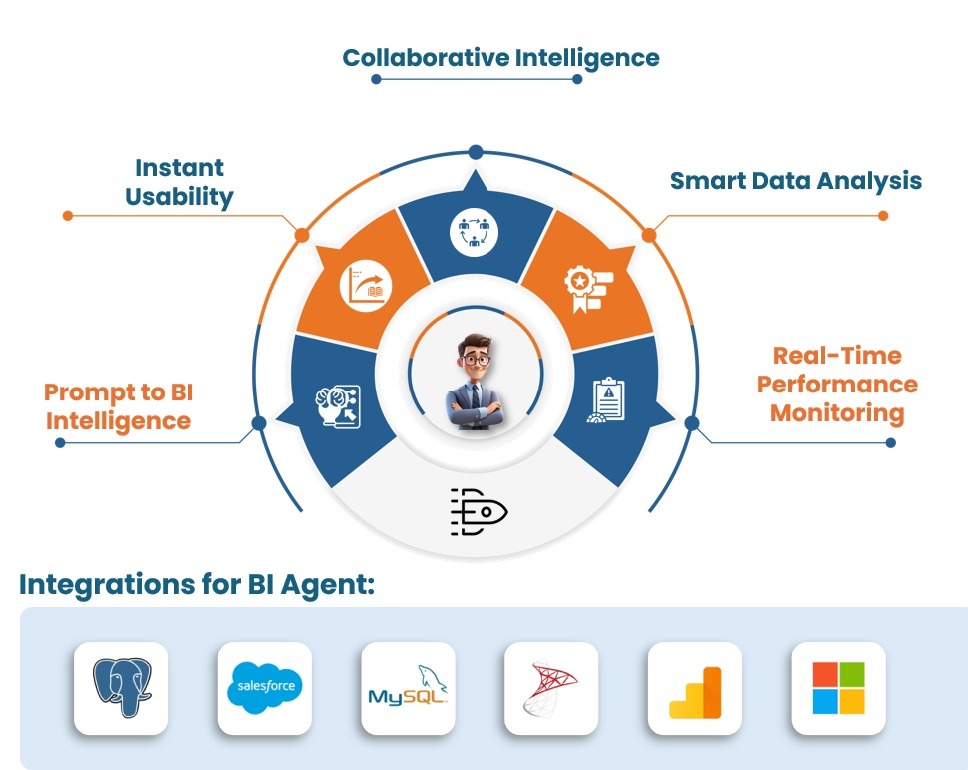
BI Agent Overview - Collaborative Intelligence, Smart Data Analysis

How the BI Agent Powers Data-Driven Excellence

The BI Agent is a key part of the ideyaLabs AiLabs platform, built to analyze data and deliver actionable business insights seamlessly.

From Data Collection to Insights, Seamlessly
Translates Business Data to Insights
Interactive Dashboard Insights
Automated Dashboard Creation & Validation
All-in-One Intelligence Hub
BI Agent - Collaborative Intelligence, Smart Data Analysis, Real-Time Performance Monitoring
BI Agent - Data Cleaning, Data Modeling, Smart Analysis, Visual Insights
WHY BI AGENT?

How the BI Agent Transforms Data into Decisive Action

The ideyaLabs BI Agent delivers AI-driven data orchestration that transforms your analytics process, ensuring seamless continuity from raw data ingestion to predictive strategic insights.

BI Agent - Data Cleaning, Data Modeling, Smart Analysis, Visual Insights
Why Choose the BI Agent for Excellence?

How to Transform Prompts into Insights Instantly

AI-driven "Prompt-to-Insight" intelligence converts natural language queries into complex dashboards and detailed reports in minutes, drastically reducing the time-to-insight.

Why use Strategic Predictive Analytics?

Automated evaluation of historical data and market trends to intelligently forecast outcomes, ensuring your team proactively adapts to future risks and opportunities.

Seamless Data Unification

Automated aggregation of structured and unstructured data sources that streamlines KPI tracking, keeping your operational metrics and strategic goals tightly aligned.

Integrated Visual Storytelling

Eliminate static reporting tools with auto-generated interactive charts, heat maps, and executive dashboards that visualize complex data narratives alongside real-time metrics.


BI
BI Agent

ideyaLabs BI Agent Workflow: 5 Intelligent Phases

1

Requirement Analysis

Pinpointing Strategic Business Insights

2

Data Preparation

Seamless Data Integration and Cleansing

3

Dashboard Blueprint

Tailored Visualization Design Framework

4

Dashboard Build

Dynamic, User-Centric Dashboard Creation

5

Customize & Approve

Streamlined Validation and Deployment

BI Agent: Frequently Asked Questions

Common questions about the Data to Decisions automation engine of AiLabs.

What is the BI Agent and its role in AiLabs?

The BI Agent is the "Data to Decisions" automation engine within the AiLabs platform. It is designed to analyze raw business data and deliver actionable insights through automated dashboards. Its primary role is to bridge the gap between data collection and strategic decision-making by eliminating the complexity of traditional business intelligence tools.

What is the primary function of the BI Agent?

The BI Agent functions as an intelligent analyst that translates business data into visual insights. • Core Capability: It utilizes Prompt-to-BI Intelligence to convert raw data sets into actionable business insights rapidly. • Automation Scope: It handles data integration, cleansing, visualization design, and dashboard deployment. • Objective: It ensures "Real-Time Performance Monitoring" and "Smart Data Analysis" to support data-driven excellence.

What are the intelligent phases of the BI Agent workflow?

The BI Agent operates through a structured five-step workflow called "Intelligent Phases" to ensure accurate reporting. 1. Requirement Analysis: It identifies and pinpoints strategic business insights required by the user. 2. Data Preparation: It performs seamless data integration and cleansing to ensure accuracy. 3. Dashboard Blueprint: It creates a tailored visualization design framework based on the analyzed data. 4. Dashboard Build: It executes the creation of dynamic, user-centric dashboards. 5. Customize & Approve: It finalizes the output through streamlined validation and deployment for stakeholder use.

How does the BI Agent handle data integration?

The BI Agent features an "All-in-One Intelligence Hub" that integrates with various external data sources. • Database Ready: It provides smooth integration with major platforms like Salesforce and MySQL. • Spreadsheets: It supports direct data ingestion from Google Sheets and other structured formats. • Cleansing: It includes automated data preparation steps to clean and standardize inputs before analysis.

Does the BI Agent require external visualization tools?

No, the BI Agent includes a "Built-In Analytics & Visualization" engine, removing the need for third-party software. • Auto-Dashboard Creation: It automatically generates comprehensive dashboards without requiring tools like Tableau or Power BI. • Interactive Insights: Users can interact with the dashboards to explore data points and trends directly within AiLabs. • Design Framework: It applies a tailored visualization framework to ensure charts and graphs are clear and impactful.

What makes the BI Agent unique compared to traditional BI tools?

The BI Agent distinguishes itself through its Prompt-to-BI Intelligence and No Learning Curve design. • Speed: It converts raw data into insights in minutes using simple prompts, avoiding complex query languages. • Usability: It features a BI-friendly interface with guided workflows, making it accessible to non-technical users. • Standards: It enforces enterprise-grade "Analytics Standards" to ensure that insights are accurate and actionable.

How does the BI Agent ensure data accuracy?

The BI Agent employs a "Human-in-the-Loop AI" approach to validate data and insights. • Iterative Refinement: It supports iterative insight refinement, allowing users to validate dashboards at every stage. • Validation: The workflow includes specific steps for data cleansing and final dashboard approval to prevent errors. • Anomaly Detection: It includes capabilities for detecting anomalies within the data sets to flag potential issues early.

Can the BI Agent detect business anomalies?

Yes, the BI Agent includes specific features for Anomaly Detection and smart data analysis. • Smart Analysis: It scans data streams to identify irregularities or trends that deviate from the norm. • Reporting: It highlights these anomalies in executive reports and dashboards to prompt immediate business responses.

Stop Analyzing Manually. Start Deciding.

The future of business intelligence is autonomous. Don't let data preparation bottlenecks define your decision-making speed.

Schedule your technical demo with ideyaLabs today and experience the power of the BI Agent.

Book Demo