



ideyaLabs LogoideyaLabs LogoideyaLabs Logo
iTAF: The Premier AI-Enabled Test Automation Framework

  • 10x Faster Testing with ideyaLabs iTAF's AI & Parallel Execution
  • Unified Testing: Web, Mobile, Desktop & API on One Dashboard
  • iTAF: Your End-to-End Partner for Complete Test Automation
  • Seamless CI/CD Integration: Streamline Your QA Workflow with iTAF
  • Robust & Reliable: Minimize Maintenance with iTAF Automation
  • Empower Your Entire QA Team with iTAF's No-Code Platform

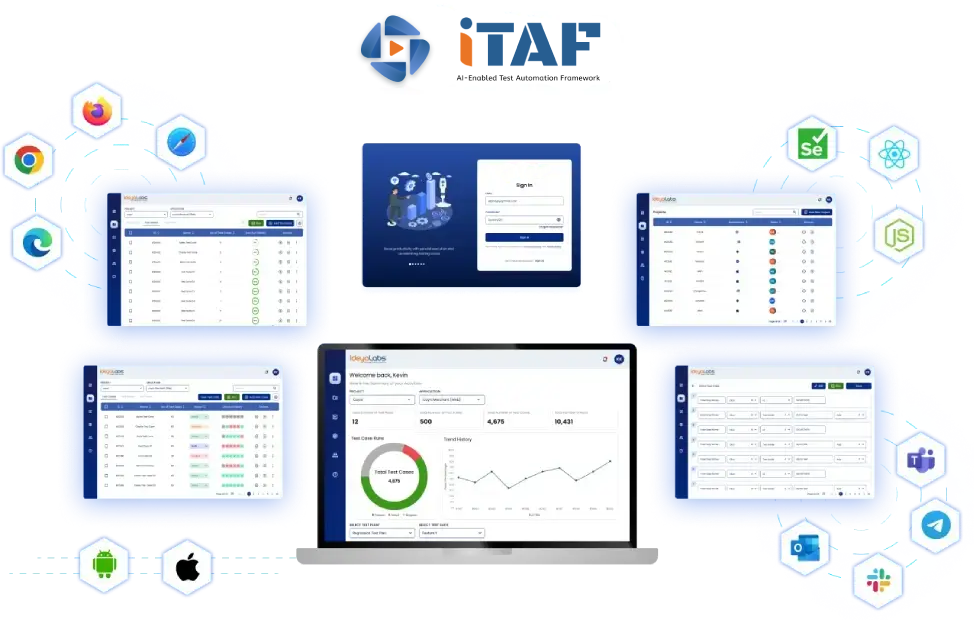
iTAF Interface

Why Choose iTAF as Your End-to-End Test Automation Partner?

iTAF automates 100% of your application portfolio with AI-driven precision.


Web Application Testing
Mobile Application Testing
  • Device compatibility: Test on a wide range of mobile devices and operating systems.
  • Performance testing: Optimize app performance under varying network conditions.
  • Usability testing: Evaluate user experience and identify areas for improvement.
  • Security testing: Protect sensitive user data and prevent unauthorized access.
  • Compatibility testing: Verify app functionality across different OS versions and screen sizes.
API Testing
Desktop Application Testing
Database Testing
iTAF Dashboard
No-Code Test Automation Workflow

How does the iTAF Automation Process accelerate software delivery?

Test Creation
Test Creation

Users create test cases using a user-friendly, no-code interface. This involves defining test steps, input data, and expected outcomes.

Test Execution
Test Execution

iTAF executes tests across various platforms (web, mobile, desktop, API) based on defined schedules or on-demand.

Test Analysis
Test Analysis

Detailed reports and analytics are generated, providing insights into test results, performance metrics, and areas for improvement.

Continuous Integration

iTAF seamlessly integrates with CI/CD pipelines to automate testing as part of the development process.

Collaboration
Collaboration

Multiple users can collaborate on test creation, execution, and analysis.

Optimization
Optimization

iTAF analyzes test results to identify opportunities for test optimization and improvement.

Proven Results: A Testament to the Value Delivered

Test Execution
0M+

Test Execution

QA Teams
0K+

QA Teams

Reduced Testing Effort
0%

Reduced Testing Effort

What key features drive iTAF's performance?
7 Core Capabilities for Intelligent Automation


iTAF Analytics Dashboard
  • No-Code Automation

    Create robust tests without extensive coding.

  • Cross-Platform Testing

  • Parallel Testing

  • Data-Driven Testing

  • Advanced Reporting and Analytics

  • Robust Test Management

  • AI-Powered Test Optimization

Seamless Integration for a Unified Workflow

iTAF seamlessly integrates into your existing development ecosystem, streamlining collaboration and accelerating time-to-market.

iTAF Integration

Building the Future with Our Advanced Software Testing and Quality Assurance Services Tech Stack

Shaping the Future with our advanced Software Testing and Quality Assurance Services Tech Stack, ideyaLabs utilizes the latest tools and techniques to guarantee superior software quality. Our comprehensive tech stack features:
Apache JMeter
BlazeMeter
Visual Studio
LoadRunner
Silk Performer

Frequently Asked Questions about ideyaLabs iTAF

Straightforward answers about our AI-Enabled Test Automation Framework.

1. What is ideyaLabs iTAF and what makes it unique?

ideyaLabs iTAF is an AI-enabled, no-code test automation framework designed to accelerate the entire software testing lifecycle. It uniquely combines a drag-and-drop interface with advanced capabilities like self-healing, video recording, and visual comparison. This allows teams to automate web, mobile, and API testing without writing complex code, significantly reducing maintenance costs and effort.

  • No-Code Simplicity: Non-technical users can build robust automation flows for Web, Mobile, and APIs easily.
  • AI-Driven Stability: The framework uses AI to detect UI changes and self-heal scripts to prevent test failures.
  • Unified Dashboard: It consolidates data-driven testing, parallel execution, and cross-browser compatibility into a single view.

2. How does iTAF compare to competitors like Tosca, Testim, and TestSigma?

ideyaLabs iTAF offers superior value compared to tools like Tosca, Testim, and TestSigma by including advanced visualization features as standard. Unlike its competitors, iTAF provides built-in Video Recording, Visual Comparison, and Live Updates via socket connections out of the box. It is also the only platform in its class to offer direct Export to Playwright and native Telegram Integration.

  • Customization: iTAF offers White Labeling options that can be deployed in 4 to 12 weeks, unlike the limited options of competitors.
  • Cost Efficiency: It is engineered as a "Cost Savings Hero," reducing the need for large specialized automation teams.
  • Feature Set: It includes exclusive collaboration tools that traditional legacy platforms lack.

3. What are the core components of the iTAF architecture?

The iTAF architecture relies on a modern, high-performance tech stack to ensure scalability and speed. The core automation engine is built on Node.js and Playwright, delivering fast execution across diverse environments. The platform features a React.js frontend, an Express.js and Sequelize backend, and utilizes MongoDB and AWS S3 for secure and robust data storage.

  • Data Integrity: All data inputs are rigorously validated using Joi Validation protocols.
  • Scalability: The Client-Engine-Server architecture supports seamless local and remote execution scaling.
  • Modern Stack: The use of Playwright ensures reliable cross-browser automation compared to older Selenium-based wrappers.

4. How does iTAF use AI to reduce test maintenance?

iTAF utilizes AI-Powered Self-Healing to automatically adapt to application changes, drastically reducing manual maintenance. When a developer updates a UI element, the framework intelligently detects the new attributes and adjusts the test script in real-time. This "UI Framework Freedom" ensures that valid tests do not fail due to minor cosmetic code changes.

  • Smart Locators: The system maintains an intelligent Locator Repository to optimize element identification.
  • Auto-Recovery: Built-in retry mechanisms handle temporary network instability or infrastructure hiccups automatically.
  • Stability: This approach eliminates the "flakiness" often associated with traditional automation scripts.

5. Can ideyaLabs iTAF execute parallel and cross-browser tests?

Yes, iTAF is built for speed and supports Parallel Execution and Cross-Browser Compatibility Testing by default. Teams can run thousands of test cases simultaneously across Chrome, Firefox, and Edge, reducing regression testing time from days to hours. It also connects with cloud grids to ensure applications work perfectly on every device.

  • Blazing Speed: Parallel execution slashes total testing time, enabling faster release cycles.
  • Cloud Integration: It integrates natively with BrowserStack and SauceLabs for massive device coverage.
  • Consistent Quality: Users ensure a uniform experience across all major browsers and viewports.

6. What collaboration tools does iTAF integrate with?

ideyaLabs iTAF integrates deeply with the modern DevOps and collaboration ecosystem to keep teams synchronized. It connects directly with JIRA for issue tracking and pushes real-time alerts to communication platforms like Slack, Microsoft Teams, and Telegram. This ensures developers and QA engineers stay aligned on build status and defects.

  • Real-Time Alerts: Stakeholders receive instant notifications on test pass/fail status.
  • Traceability: Bugs are automatically logged in JIRA with full context and evidence.
  • CI/CD Ready: It plugs into pipelines via tools like Jenkins and GitHub Actions for continuous testing.

7. Does iTAF include visual testing and video recording capabilities?

Yes, iTAF distinguishes itself by recording a video of every test run and performing automated Visual Comparisons. This allows testers to replay the exact user journey to pinpoint where a failure occurred. The system also compares screenshots against approved baselines to detect pixel-level visual regressions that code-based scripts might miss.

  • Indisputable Evidence: Video logs provide clear proof of bugs, speeding up the debugging process.
  • Visual Validation: It catches layout shifts and rendering issues automatically.
  • Detailed Logs: Users can view system logs alongside video playback for complete context.

8. Is iTAF designed for non-technical users?

Absolutely, iTAF features a "No-Code, User-Friendly Approach" specifically designed to eliminate the steep learning curve of automation. It offers a drag-and-drop interface and a library of over 200 Pre-Built Keywords (like "Click Element" or "PDF Validation"), allowing users to build complex tests without writing complex code.

  • Web Test Recording: Users can simply browse a website, and iTAF records the actions to generate a script.
  • Keyword Library: A vast library of pre-coded actions covers almost every testing scenario.
  • Accessible Analytics: The centralized dashboard presents project health and analytics in a clear, business-friendly format.

Contact Us

(*) Asterisk denotes mandatory fields

We hate spam, and we respect your privacy.